
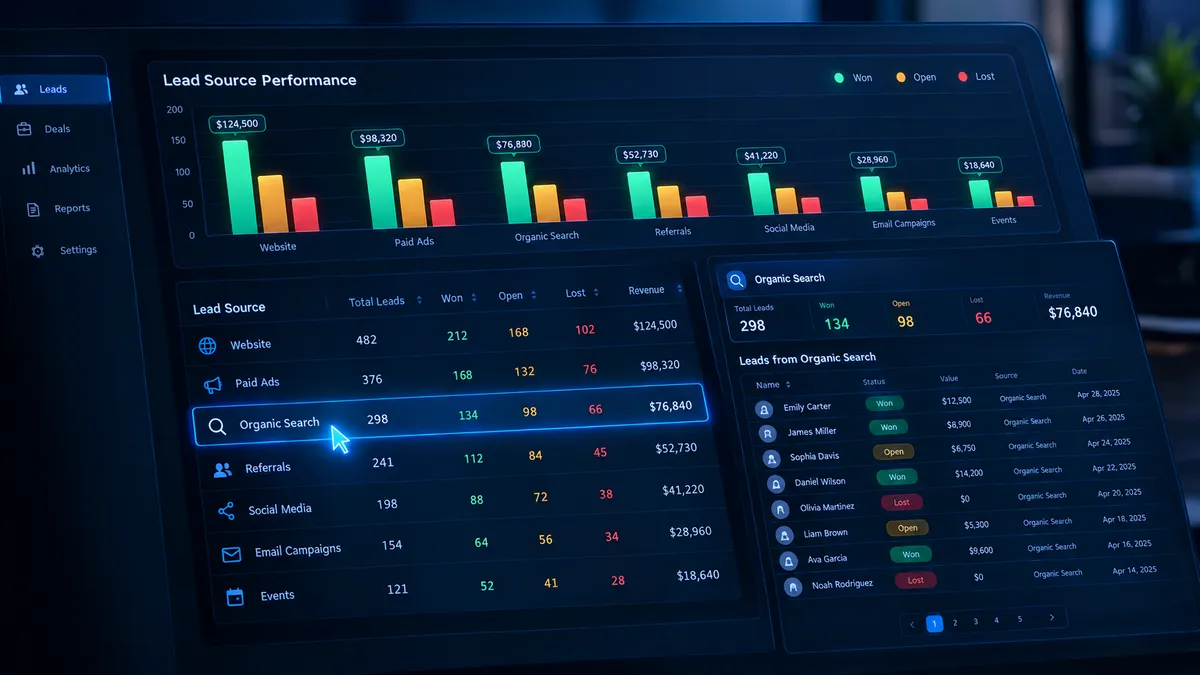
See Who's Behind the Numbers: Lead Source Reporting Just Got a Major Upgrade in Attractzen
Your Lead Source Report Now Shows You the Full Picture
A count is useful. A clickable count that opens the exact list of leads behind it — with dollar values attached — is actionable. Attractzen's Lead Source Report just made that leap.
This update brings meaningful depth to one of the most-used reporting tools in your dashboard: you can now drill into any number, see the revenue each channel generates by deal status, surface leads with no source attached, and work from a cleaner, more readable table layout.
What's New
Drill Into Any Count
Every number in the Lead Source Report is now clickable. Click Total leads, Open, Won, Lost, or Abandoned under any source row and you'll immediately see the specific opportunities that make up that number — without leaving the report or running a separate search.
If a count is zero, it's not clickable. Any count above zero opens the list instantly.
Revenue Value for Every Status
The report now shows the monetary value associated with each pipeline status — not just the total. You can now see the dollar value of Open deals, Won deals, Lost deals, and Abandoned deals broken out by source, side by side.
This means you can finally answer questions like: Which channel is generating the most open pipeline right now? Which sources are winning at a higher dollar value?
Find Leads Without a Source
The Source filter now supports two new options: "Is empty" and "Is not empty." This makes it straightforward to isolate opportunities that never had a source assigned — a data quality check that used to require manual workarounds.
Opportunities without a source also now appear as "N/A" in the report table instead of being silently excluded, so you always have an accurate picture of what's in your pipeline.
A Cleaner Table to Work From
Rows now have consistent heights, and columns stay readable even on smaller screens — making it easier to scan across sources and statuses without losing your place.
Why This Matters
Attribution only works when you can trust the data — and act on it quickly. These updates close three gaps that were slowing teams down:
- From numbers to names. A count in a report used to be a dead end. Now every count is a doorway into the specific leads that make it up. You don't have to cross-reference a separate contact list or re-filter your pipeline view.
- Know what each channel is actually worth. Total lead counts tell you volume. Revenue by status tells you value. Seeing open, won, and lost dollar amounts per source lets you make smarter decisions about where to invest your marketing budget.
- Keep your attribution clean. Unattributed opportunities distort every report they touch. The "N/A" row and "Is empty" filter give you a clear path to finding and fixing missing source data — so your channel reporting reflects reality.
A Note on Permissions
Revenue values in the Lead Source Report are only visible to users who have permission to view lead value in your Attractzen account. If you're not seeing dollar amounts, check with your account admin about your permissions level.
What's Coming Next
The team is working on support for using a custom field as the revenue source inside the Lead Source Report — giving you even more flexibility in how you track and attribute pipeline value across your business.
See What Attractzen Can Do for Your Pipeline
Smarter reporting is just the start. Attractzen gives you the CRM, automation, AI, and analytics tools your team needs to attract more leads, convert them faster, and keep customers longer.

Attract
CRM
Import tool
Dialer
IVR phone tree
Voicemail drop
Text (SMS)
Social media planner
Live Chat
A.i. Conversations
Facebook ads
Google ads
Online events
In person events
Lead Magnets
Optin forms
Surveys
Landing pages
Build
Automations
Tasks
Notes
Pipelines
Opportunities
Smart lists
Lead Scoring
Notifications
Bulk SMS
Bulk Email
Newsletter
Blog
A.i. Content
Reputation management
Pixel retargeting
Convert
Appointment scheduling
Zoom
Google Meet
Order forms
Coupon codes
Proposals
Estimates
Invoices
Affiliate Manager
Communities
Stripe / Authorize.net / NMI
Sign Up for our Newsletter
Support
See a demo
Getting started
FAQ's
Help docs
1:1 onboarding
Software updates
Community
Marketplace
Funnel build
Webinar build
Membership setup
Newsletter setup
Blog setup
Affiliate Program setup
Bulk Email setup
Company
About
Careers
Collabs
Integrations
All 628+ integrations
Zapier
Gmail 2 way email sync
Outlook/365 2 way email sync
iCal (Apple)
Google Calendar
Outlook/365 Calendar
Quickbooks
Affiliates
Quicklinks
© 2026 Attractzen
All Rights Reserved.


