Product Update: YouTube Posting
Product Update: YouTube Posting
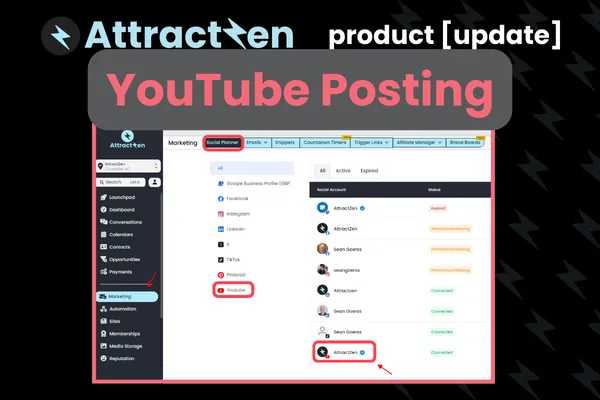
Hi everyone, Sean here with Attractzen I am excited to announce a really great feature update you may or may not have noticed. This has been a long time coming in our social planner and that is the ability to upload directly to YouTube from the social planner, both regular sized videos like landscape videos, as well as YouTube shorts. So when you're in the social planner, what you're gonna do if you need to add your YouTube account, you're gonna go to the social planner,
You're gonna go to the gears icon for settings. Here you're gonna see all of your connected accounts. If you'd like, you can click down to YouTube, see if you don't already have it connected or if it's maybe needs to be refreshed. Otherwise, you're gonna click connect social. From here, you're just gonna choose connect to YouTube. Now, when you connect to YouTube, it's gonna tell you how long that validity of that token authorization is good for. It's normally good for 30 days.
By the way, if you want, can set up additional notifications for things as the tokens expire. They're different for each social media. They have this as a security feature where you can get notified ahead of time to make sure to go in and reauthorize it. You have to be logged in as the user who is in Attractzen and as the user who has manager level access to that social media. So that's how you connect to YouTube. And then to use YouTube, you can just click new post.
create new post, and then in here you can literally just go down and select YouTube, and you can type in here, this would be for the body content, you would actually select the video right here by clicking this icon for video. This is gonna take you to your media library in Attractzen where you would upload the video. So you're gonna click upload file, you're gonna upload the file. After you do that, and I suggest putting them into a folder, you're gonna select it.
It's gonna show up here. And then you've got some advanced options if you want. You can select a category. You can select some search tags or whatever. You can give it a title. That's super important to give it a title. And then describe the post type. Is it a regular 16 by nine video versus a shorts? think shorts at the minute is, at the moment is limited to three minutes or less. And it should be in that 16 by nine format if you're doing that versus just a regular video.
It's gonna show you a preview here. You can choose the privacy level, public, private, unlisted, and then you click post. Now, if you wanna get really advanced, we do have grouping. So if you wanna take all of your shorts and you wanna post them, that video across all your different mediums, like Instagram, TikTok, and YouTube shorts, you could do that right here. So pretty exciting stuff. Let us know if you have any questions. As always, we're really excited on how you're gonna be able to leverage this.
to just post all your social media from one place to everywhere. Thanks again, and we'll talk to you soon.


